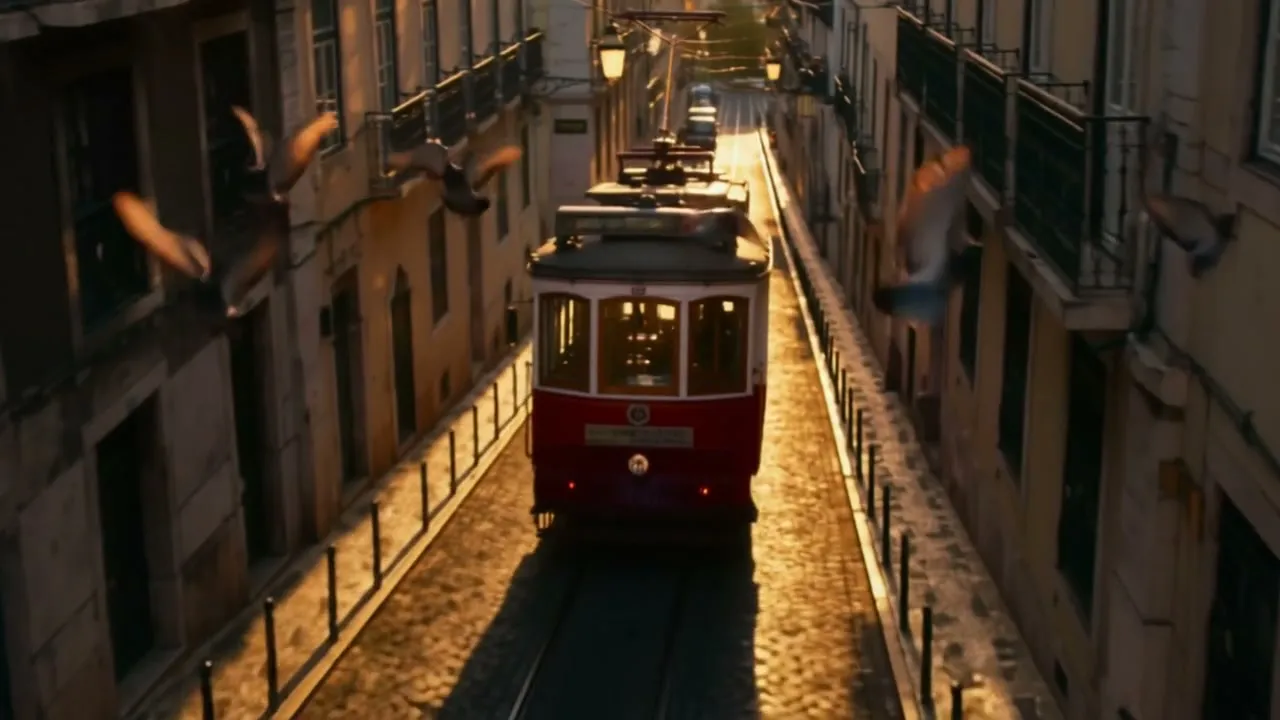
Tram rolling toward the camera

Prompt: The vintage red tram rolls downhill toward the camera along the narrow Lisbon street, pigeons sweep across the frame, the camera slowly descends to street level. Tram bell, rumbling wheels and fluttering wings.
Choose a category

3 models available
8 models available

3 models available
5 models available
6 models available
3 models available

8 models available
Animate one image into a 1–15 second clip that keeps its framing, with optional audio.
Describe how the image should move: subject action, camera move, and sounds if audio is on.
Choose 1–15 seconds. Priced by the second.
540p is a good draft size; switch to 1080p for the final render.
Adds sound effects, ambience and speech. Costs more per second.
Upload one picture and PixVerse V6 animates it. The video opens on your image, keeps its aspect ratio and moves the way your prompt describes, for 1 to 15 seconds at up to 1080p. Add generated audio when the scene should be heard as well as seen.
Describe motion, not the picture — the model can already see what is in the image.
Your image fixes the look; the prompt supplies the movement.
PixVerse V6 treats the upload as the very first frame of the video, so products, faces, illustrations and landscapes start exactly as you supplied them. Anything that must stay recognisable should already be in the picture.
There is no aspect-ratio menu on this page because the output follows the image. A vertical photo gives a vertical video; a wide render gives a wide one. Crop the image before uploading if you need a different shape.
Typical uses: a product photo that slowly rotates, a portrait that turns and smiles, a game concept that gets a camera fly-through, a family photo with gentle movement. Short 2–4 second runs are often enough for these.
Switch on Generate Audio to add ambience that fits the picture — waves for a beach, traffic for a street, a line of speech for a character. Mention the sound in the prompt so the model knows what to produce.
Change one part of the input at a time so you can judge what helped.
Upload, describe the movement, generate.
Add a single JPEG, PNG or WebP file up to 20MB. Sharp, well-lit images with a clear subject animate best. This page accepts exactly one image; for a start and an end picture use V6 Transition instead.
Write the action and the camera: “She turns toward the window and smiles, slow push-in.” Skip describing colours and clothing that are already visible — spend the words on movement.
Set 1–15 seconds and 360p to 1080p, decide on audio, then check the credit cost and submit. Try a short low-resolution run first to confirm the motion before paying for the final size.
Change one part of the input at a time so you can judge what helped.
An original PixVerse V6 image-to-video result generated on Flow Veo 3 from the single input image shown below. The input is a frame from our own PixVerse V6 text-to-video sample.

Prompt: The vintage red tram rolls downhill toward the camera along the narrow Lisbon street, pigeons sweep across the frame, the camera slowly descends to street level. Tram bell, rumbling wheels and fluttering wings.
Answers about this workflow, inputs and output settings.
A sharp image with one clear subject and some space for it to move into. Heavy text overlays, collages and very low-resolution pictures tend to warp when animated.
Not on this page — it takes exactly one image as the opening frame. If you have a start picture and an end picture, the PixVerse V6 Transition page uses both.
The video keeps the aspect ratio of your image, so the setting is not needed. Crop or pad the image beforehand to change the shape of the result.
JPEG, PNG and WebP, up to 20MB. The file is uploaded when you add it and checked by our content moderation before a generation starts.
Not necessarily. Only the first frame is fixed; the model decides where the motion leads. To control the ending as well, supply a last frame on the Transition page.
Yes. Credits are held at submission and the hold is released automatically when a generation fails.
Choose the workflow that matches your source material.